3D product configurator
Turn static catalogs into interactive, customizable 3D experiences. 3D Product Config lets your customers build the exact product they want — and see it from every angle before they buy.
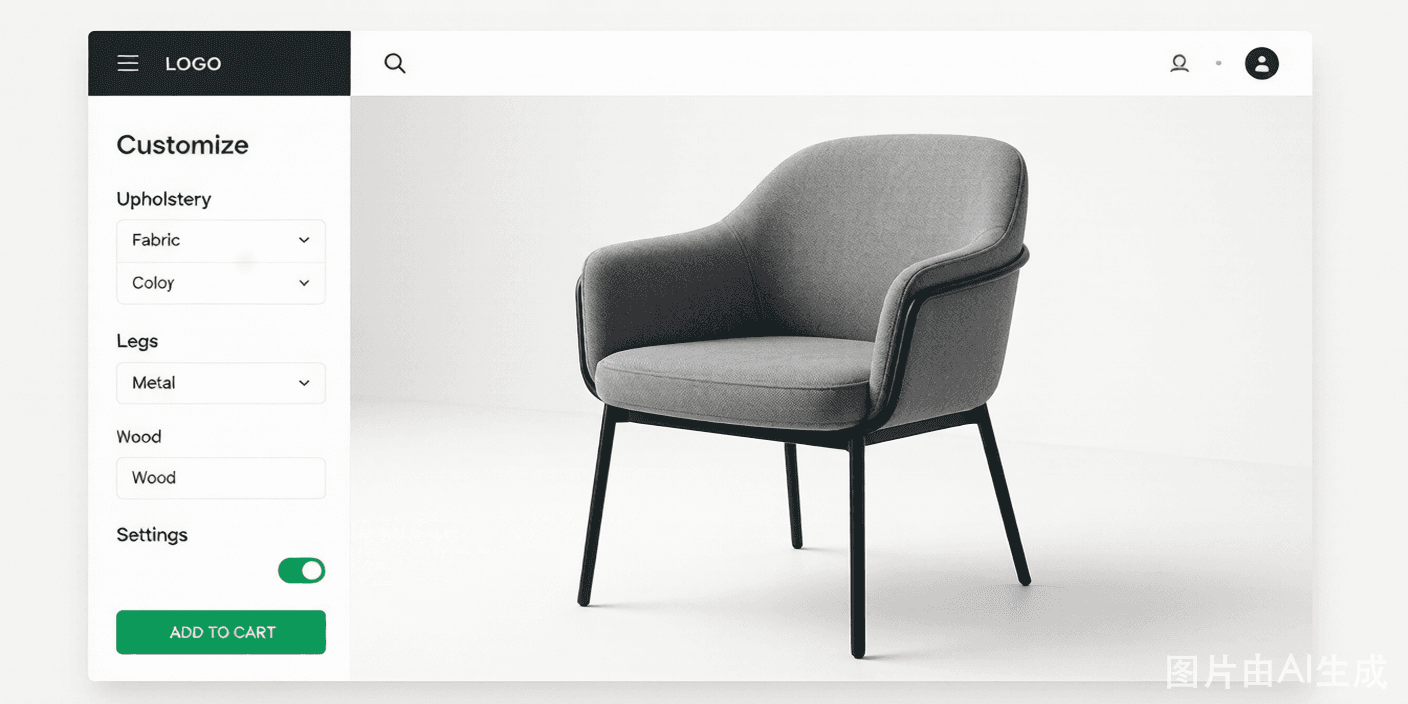
Why teams choose 3D Product Config for their 3D product configurator
A 3D product configurator removes the guesswork from online shopping. Instead of imagining how a fabric, finish, or size will look, customers assemble the product themselves in a live 3D viewer. That confidence translates directly into higher add-to-cart rates and fewer "not as described" returns.
3D Product Config is built for speed. Upload your GLB, GLTF, OBJ, or FBX models, define the options your buyers care about, set pricing rules, and publish the configurator anywhere with a single embed code. No developers, no long implementation cycle, no per-seat fees.
The psychology of control is the quiet engine behind every configurator. When a shopper personally picks the color, the material, and the size, they begin to feel ownership of the product before they ever pay. That sense of authorship is one of the strongest predictors of a completed purchase — and it is impossible to manufacture with a flat image gallery.
One 3D asset powers your entire funnel. The same GLB you upload drives the web configurator, the mobile AR preview, and the sales demo, so you stop paying to rebuild the same product for every channel. Marketing, eCommerce, and sales all point at a single source of truth instead of drifting copies.
Speed to market matters more than perfection. Because 3D Product Config is no-code, your marketing team can ship a configurator this sprint instead of waiting a quarter for engineering. You learn what buyers actually configure, then refine — a feedback loop that static catalogs can never give you.
Accessibility widens your addressable market. Because the configurator runs in the browser with standard, keyboard-navigable controls, shoppers who rely on assistive technology can still build and buy — a baseline that desktop-only configurator software routinely fails to meet.
Every interaction becomes a signal. Which finish gets picked, where shoppers hesitate, which upgrade they skip — all of it is measurable, turning a product page from a static brochure into a continuous conversation with your market that you can optimize week over week.
Why teams choose 3D Product Config
Real-time 3D rendering
Customers rotate, zoom, and recolor products instantly in the browser — no plugins or downloads.
No-code builder
A drag-and-drop studio lets marketing and product teams ship configurators without engineering help.
Conditional logic
Hide incompatible options automatically so shoppers only ever build valid, orderable products.
Dynamic pricing
Prices update live as options change, with rules for materials, sizes, and volume discounts.
eCommerce native
Native Shopify, WooCommerce, BigCommerce, and Magento integrations keep pricing and inventory in sync.
AR preview
Let mobile shoppers place the configured product in their own space with one-tap augmented reality.
Everything inside the configurator
360° product viewer
A smooth, mobile-first viewer shows every angle and detail of the configured product.
Material & color library
Manage swatches, PBR textures, and finishes from one asset manager.
Option dependencies
Define rules like "leather seat ⇒ hide fabric back" to prevent impossible combinations.
Quote & checkout handoff
Pass the finalized configuration, price, and BOM straight to cart or CPQ.
From model to live configurator in 3 steps
Upload your 3D models
Import OBJ, GLB, GLTF, or FBX files and organize textures and materials in the asset manager.
Configure options & pricing
Map options, dependencies, and dynamic pricing rules with clicks, not code.
Publish & embed
Drop a single line of code on any page or product listing and start selling in 3D.
Where a 3D product configurator delivers the most
Made-to-order manufacturing
Capture exact specifications and generate a build-ready bill of materials.
Furniture & home goods
Let shoppers choose fabric, wood, and dimensions and see the result in real time.
Promotional & branded products
Sell personalized merch with live previews of colors, text, and logos.
Industrial & B2B quotes
Guide distributors to valid configurations and produce accurate quotes instantly.
How a 3D product configurator works under the hood
It starts with model ingestion. You upload a GLB, GLTF, OBJ, or FBX and 3D Product Config optimizes it for the web — Draco geometry compression, KTX2 texture compression, and level-of-detail tuning — so a detailed product loads in well under two seconds instead of stalling the page. The original asset is preserved; only the delivered copy is compressed.
Next comes scene binding. Each option you define — a fabric, a finish, a component — is wired to specific nodes, materials, or transforms inside the 3D scene. When a shopper picks "walnut," the platform swaps the associated material; when they add a drawer, it shows the matching geometry. Nothing is faked with overlay images; the change is real.
Rendering happens in real time through a WebGL engine with progressive loading, so the configurator becomes interactive before every texture finishes downloading. Shoppers can rotate, zoom, and recolor immediately, and the experience stays smooth even on a mid-range phone because the heavy lifting is batched and GPU-accelerated.
Finally, the build is handed off as structured data: the chosen configuration, its calculated price, and a bill of materials flow into your cart, your CPQ system, or your manufacturing queue. Because the price and the model come from the same rule set, what the customer saw is exactly what gets ordered, built, and billed — with no manual translation step where errors creep in.
You do not have to babysit infrastructure. Models, rules, and prices live in 3D Product Config's managed cloud, so you get CDN-backed reliability without standing up render farms or 3D servers — the operational overhead that sinks most in-house configurator projects.
3D Product Config vs. a static image gallery
How a unified 3D configurator platform compares with static image galleries and patched-together tools.
| Capability | 3D Product Config | Legacy / static |
|---|---|---|
| Real-time 3D preview | Yes | No (flat images) |
| No-code setup | Yes | No (developers) |
| Dynamic pricing | Yes | Manual spreadsheet |
| AR try-before-buy | Yes | No |
| Store sync | Yes | Manual export |
| Build-ready BOM | Yes | No |
Frequently asked questions
What is a 3D product configurator?
A 3D product configurator is an interactive tool that lets shoppers customize a product — colors, materials, sizes, parts — and view a photorealistic 3D model update in real time. It replaces static image galleries with a build-it-yourself experience.
Do I need developers to build one?
No. 3D Product Config is a no-code platform. You upload models, define options and pricing, and embed the configurator. Developers can extend it later via the OpenAPI if needed.
Which 3D file formats are supported?
3D Product Config supports GLB, GLTF, OBJ, and FBX, including models with textures and PBR materials. We also optimize models for fast web delivery.
Will it work on my store?
Yes. 3D Product Config integrates natively with Shopify, WooCommerce, BigCommerce, and Magento, and provides a single-line embed for any other website.
How does it reduce returns?
Customers see exactly what they are ordering before checkout, so expectations match reality. Teams using 3D Product Config typically report return reductions of up to 40%.
How long does implementation take?
Most teams publish their first configurator within a few days. Upload your model, map the options you already sell, and embed the snippet — no engineering project required.
Can I A/B test configuration options?
Yes. Because options live in the no-code studio, you can adjust defaults, reorder choices, or test different option sets and measure the impact with built-in analytics.
Is my 3D intellectual property secure?
Models are stored in access-controlled cloud infrastructure and delivered through a CDN with optimization that makes re-engineering difficult. You control who can edit or export source assets.
Does it support multiple languages?
Yes. Configurator copy, option labels, and UI strings can be localized so international shoppers configure in their own language.
Explore more 3D configurator solutions
Ready to launch your 3D configurator?
Join thousands of brands using 3D Product Config to create interactive product experiences. Free 14-day trial. No credit card required.